Options research, without the chain fatigue

See the setup.
Understand the trade.

Option Lens organizes refreshed options data into ranked, explainable setups across six strategies—then helps you save, monitor, and learn from them.

  • Free to start
  • No brokerage connection
  • iOS and Android
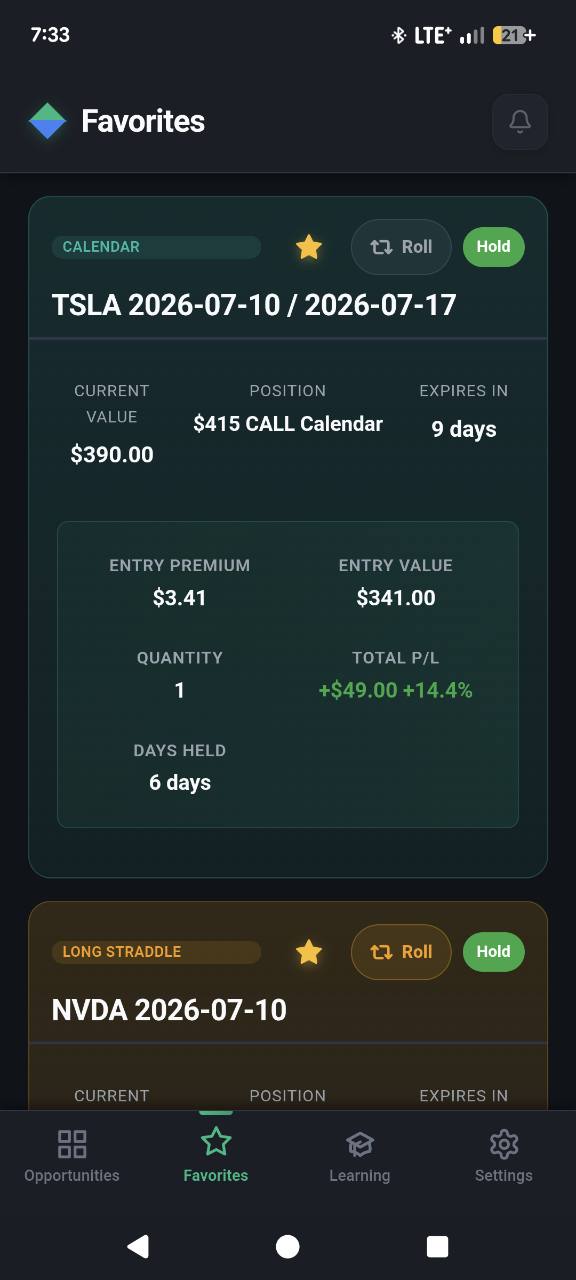
Actual Option Lens Favorites screen showing a calendar spread, contract value, position profit and loss, and a Roll action
Strategy-aware scoring Four lenses, one readable score Volatility · Execution · Efficiency · Mechanics
Actual in-app screen
6 supported strategy types
0–100 strategy-aware setup score
2 modes Easy and Full experiences

A calmer research loop

From options data to a decision you can explain.

Option Lens narrows the research surface. It gives you useful context without pretending a score can make the decision for you.

  1. 01

    Find the shortlist

    Browse scored setups, filter by strategy, and search symbols instead of working through a raw chain from scratch.

  2. 02

    Read the reasons

    See how volatility, execution quality, premium or debit efficiency, and strategy mechanics shape each score.

  3. 03

    Track what changes

    Save a setup, follow contract-dollar value and open P/L, and use exit alerts or roll candidates as research prompts.

Built around the actual workflow

Less hunting. More understanding.

Every feature is there to help you scan, compare, track, or learn—not to place a trade for you.

Explainable scoring

A ranking with context behind it.

The score adapts to each strategy and breaks the setup into the inputs that matter for that structure.

86/ 100
  • Volatility
  • Execution
  • Efficiency
  • Mechanics
Illustrative score breakdown
Six strategies

Credit and debit setups, in one place.

Calls Puts Strangles Iron Condors Calendars Long Straddles
Favorites

Track the position, not just the idea.

Choose quantity, see contract-dollar entry and current value, and keep open and realized roll P/L readable.

Option Lens Favorites screen with quantity and contract-dollar position tracking
Roll review

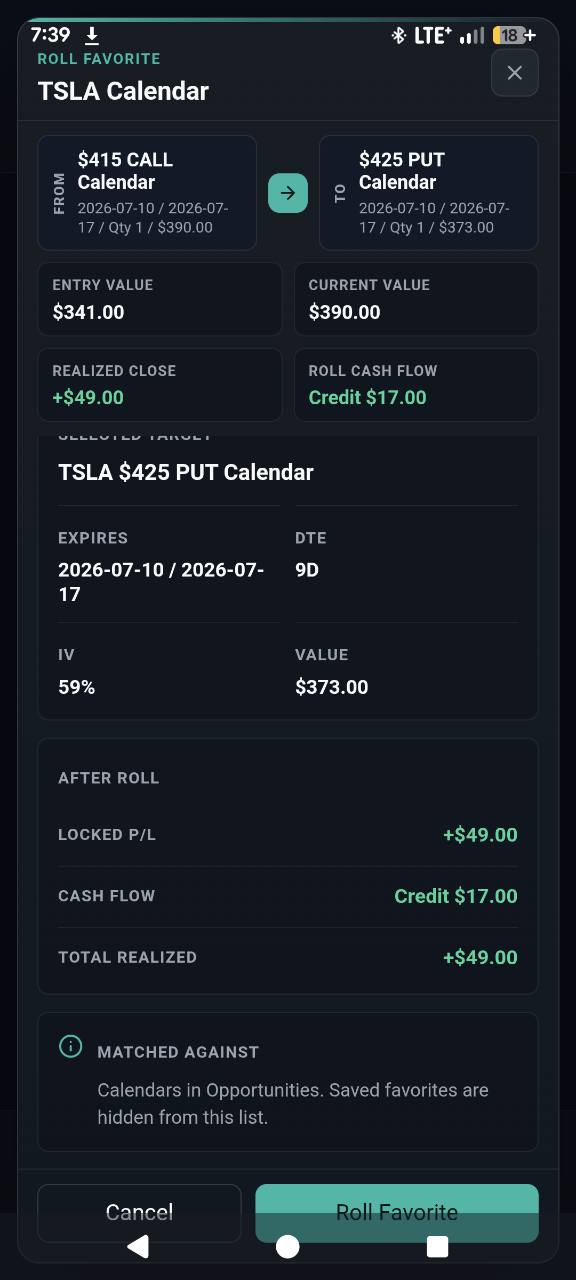
See the close and the next setup together.

Review same-symbol, same-strategy candidates while keeping realized P/L and roll cash flow visible.

Actual Option Lens roll review showing the old and new calendar positions, realized close P/L, and roll cash flow
Exit attention

Alerts are prompts to review—not instructions.

Favorites can surface changing exit scores and optional push notifications so you know when a saved setup deserves another look.

Hold Review Exit attention

Choose your level of detail

Start simple. Go deeper when you want.

Easy Mode focuses on the essential contract details and clear buy or sell steps. Full Mode opens the score, Greeks, volatility, and deeper analysis.

You can switch modes in Settings and replay the tutorial any time.

Easy ModeFocused

The essentials first.

  • Plain-language actions
  • Core contract details
  • Reduced visual density
Full ModeDetailed

More research context.

  • Score breakdowns
  • Greeks and volatility
  • Deeper setup analysis
Learning library Built in
02
Calendar spreadsTime, volatility, and two expirations
03
Long straddlesMovement, vega, and theta drag
04
Why liquidity mattersSpreads, volume, and execution quality

Learn inside the workflow

Build the vocabulary behind the score.

Guided collections, strategy-linked lessons, visual explanations, interactive examples, and quizzes help you understand what the app is showing—not simply accept a ranking.

See common questions

Clear boundaries matter

Research without handing over your brokerage account.

01

No brokerage connection

Option Lens does not ask for brokerage credentials or execute trades.

02

Scores are research context

They are not recommendations, guarantees, or a substitute for your own due diligence.

03

Verify before acting

Market data, prices, Greeks, and alerts may be delayed, incomplete, or unavailable. Check your broker before any decision.

Questions, answered plainly

What to know before you download.

Need help with an existing account? Visit the Help Center or contact support.

What does the Option Lens score mean?

Each setup receives a 0–100 score built from four strategy-aware areas: volatility, execution, premium or debit efficiency, and mechanics. It helps compare setups; it does not predict an outcome.

Which strategies are supported?

Option Lens currently supports calls, puts, strangles, iron condors, calendars, and long straddles.

Does the app place trades or connect to my broker?

No. Option Lens is a research and education app. You review ideas in the app and make any trading decisions independently through your own broker.

What is included in the free plan?

The free plan lets you browse available results and save one favorite. Premium reveals the two highest-ranked setups and removes the favorite limit. Current localized pricing is shown in the App Store or Google Play before purchase.

How current is the market data?

The app receives refreshed options data on trading days. Data can still be delayed, incomplete, or temporarily unavailable, so verify current pricing and Greeks with your brokerage platform.

Is Option Lens financial advice?

No. Option Lens provides research context and educational content only. Options involve substantial risk, and every trading decision remains your responsibility.

Available on iOS and Android

Bring a clearer process to your next options review.

Start with the free plan. Upgrade in the app only if you want the two highest-ranked setups and unlimited favorites.